To create a more ergonomic workspace, investing in the right monitor stands can make a big difference.
Adjustable options like the WALI and Hemudu help you set your screen at eye level.
For those with dual monitors, the WESTREE and HUANUO stands offer stability and flexibility.
Many models come with added storage and look good to tidy up your desk.
Stick around and you’ll find out more about the top picks and important factors to consider!
WALI Adjustable Computer Monitor Stand for Desk


The WALI Adjustable Computer Monitor Stand is a great addition to your workspace, helping you sit comfortably and reduce strain on your neck and back. With its sleek black design and adjustable heights, this stand makes it easy to create a healthier work environment.
Practical Details:
- Adjusts to heights of 3.9, 4.7, or 5.5 inches for comfort.
- Vented design keeps your devices cool and safe.
- Offers storage underneath for organizing office supplies.
- Supports up to 44 lbs, making it sturdy for various devices.
- Lightweight at 1.72 pounds for easy movement.
LCD Computer Monitor Desk Stand Mount (13-32 inch)

The LCD Computer Monitor Desk Stand Mount (13-32 inch) is a great addition for anyone wanting to improve their workspace comfort. It supports a variety of screen sizes and allows you to adjust the viewing angle to help reduce neck and back strain.
Practical Details:
- Fits screens from 13 to 32 inches to meet different user needs.
- Adjustable tilt, swivel, and height settings for better posture.
- Easy to install in about 15 minutes with the tools included.
- Built-in cable management keeps your workspace organized.
WESTREE Dual Monitor Stand Riser for Desktop
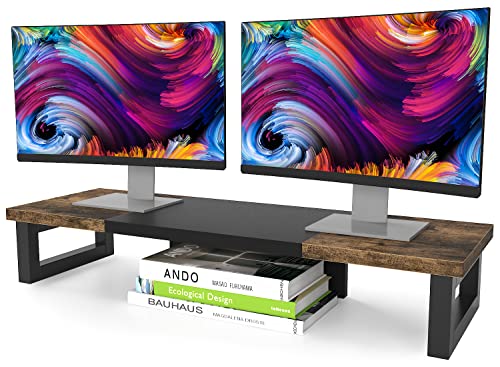
The WESTREE Dual Monitor Stand Riser is perfect for anyone managing multiple screens, whether you work from home, play games, or create content. Its sturdy design and stylish wood finish make it both functional and attractive, giving you a great way to set up your workspace.
Practical Details:
- Heavy-duty construction with solid steel legs for strong support.
- Elevates monitors for a better viewing height to ease neck and eye strain.
- Easy to put together in about 2 minutes with included tools.
HUANUO Dual Monitor Stand for 13–32″ Screens

The HUANUO Dual Monitor Stand is a great way to boost your workspace with better ergonomics. It supports dual monitors from 13 to 32 inches, making it perfect for anyone looking to reduce strain while working or gaming.
Practical Details:
- Full-motion adjustment lets you tilt, swivel, and rotate for the best viewing angle.
- Dual C-clamp design provides a secure and stable fit on most desks.
- Built-in cable management keeps your workspace neat and organized.
Hemudu Adjustable Computer Monitor Riser (2-Pack)

Elevating your workspace is key to staying comfortable during long hours on the computer, and the Hemudu Adjustable Computer Monitor Riser (2-Pack) does just that. This stand raises your monitor or laptop to a better height, helping to ease neck and back strain while you work.
Practical Details:
- Height adjustable from 3.4 to 4.9 inches for your comfort.
- Tilt function allows for forward adjustments up to 15 degrees for better viewing angles.
- Sturdy tempered glass design supports up to 88 lbs for safety and durability.
WESTREE Dual Monitor Stand Riser with Light

The WESTREE Dual Monitor Stand Riser with Light is a fantastic addition for anyone managing dual monitors or a laptop in a lively workspace. It makes working more comfortable and organized, helping you stay productive throughout the day.
Practical Details:
- Adjustable height and angle improve posture and cut down on neck and eye strain.
- RGB lighting with customizable colors makes your workspace more fun.
- Large side storage holders keep your desk tidy and clutter-free.
ELIVED 2 Pack Adjustable Monitor Stand Riser

The ELIVED 2 Pack Adjustable Monitor Stand Riser is a great pick for anyone wanting to make their workspace more comfortable. With its three height adjustments, you can easily find the right level to help ease back and neck pain during long computer sessions.
Practical Details:
- Height adjustable with three levels: 3.9”, 4.7”, and 5.5”.
- Easy setup in just one minute with no tools needed.
- Sturdy mesh metal design supports up to 44 lbs.
- Non-slip legs provide stability.
- Stackable feature keeps your desk tidy.
BONTEC Adjustable Monitor Stand Riser (2 Pack)

If you want to improve your workspace ergonomics, the BONTEC Adjustable Monitor Stand Riser (2 Pack) is a great pick for gamers, office workers, and anyone who spends long hours at a desk. With three adjustable heights, it helps you maintain better posture and reduces neck and back discomfort.
Practical Details:
- Three adjustable heights to enhance your posture.
- Fits monitors, laptops, and printers to keep your space tidy.
- Easy tool-free setup for quick assembly.
- High customer satisfaction with a 4.7-star rating.
- Ventilated mesh platform boosts airflow to prevent overheating.
HUANUO Adjustable Monitor Mount for 13 to 32 Inch

Looking to improve your workspace’s comfort? The HUANUO Adjustable Monitor Mount is a great choice, fitting monitors from 13 to 32 inches and holding up to 19.8 lbs. With its easy tilt, swivel, and rotation, you can adjust your screen to the perfect angle for your needs.
Practical Details:
- Adjust your monitor easily for the best viewing angles with tilt, swivel, and rotation.
- Install it quickly in just three minutes with all hardware included.
- Built with tough automotive-grade materials for long-lasting use.
VIVO Dual Monitor Desk Mount (Holds 2 Screens)

The VIVO Dual Monitor Desk Mount is a great way to improve your workspace if you’re managing multiple tasks. This solid mount supports two screens from 13” to 30” and holds up to 22 lbs per monitor, making it a reliable choice for boosting productivity.
Practical Details:
- Durable steel construction gives you long-lasting stability.
- Adjustable arms let you tilt, swivel, and rotate for the best viewing angles.
- Installation is simple with detachable VESA brackets and included hardware.
- Cable management clips keep your workspace neat and tidy.
TAVR Dual Monitor Stand Riser for 2 Monitors

The TAVR Dual Monitor Stand Riser is a great choice for anyone wanting to improve their workspace. It helps you create a comfortable setup by lifting two monitors to eye level, making work easier and reducing strain on your neck and back.
Practical Details:
- Adjustable length from 30.7 to 43.3 inches fits different desk sizes.
- Ergonomic design keeps monitors at eye level for better posture.
- Three shelves below for storing laptops and office supplies.
- Easy assembly in just two minutes for a quick setup.
- Solid customer rating of 4.6 stars ensures quality and satisfaction.
VIVO Dual LCD Monitor Free-Standing Desk Stand

The VIVO Dual LCD Monitor Free-Standing Desk Stand is perfect for anyone who needs to boost their productivity with dual screens. Its solid adjustability and stability make it an attractive addition to your workspace.
Practical Details:
- Full articulation lets you tilt, swivel, and rotate your monitors for the best viewing angles.
- The heavy-duty base keeps your setup stable and protects your desk from scratches.
- Quick installation with detachable VESA bracket plates and included hardware makes setup easy.
MOUNTUP Dual Monitor Stand with Gas Spring Arms

Elevate your workspace with the MOUNTUP Dual Monitor Stand. This stand is perfect for anyone looking to reduce neck and back strain while enjoying the benefits of dual monitors.
Practical Details:
- Supports monitors from 17 to 32 inches and up to 17.6 lbs.
- Full motion capabilities with 135° tilt, 180° swivel, and 360° rotation.
- Space-saving design with cable management to keep your desk neat.
- Easy to install with C-clamp or grommet options for different desk types.
EVOOMI Back Saver Monitor Stand – 2 Pack

The EVOOMI Back Saver Monitor Stand – 2 Pack is a great choice for anyone wanting to make their workspace more comfortable and reduce strain from long hours at the computer. With adjustable heights and a sturdy design, this stand helps you maintain better posture and enhances your productivity.
Practical Details:
- Adjustable heights of 3.9”, 4.7”, and 5.5” let you find the perfect ergonomic fit.
- VentTech hexagonal ports boost processing speed for heavy computer use.
- Heavy-duty HD steel construction provides lasting stability and support.
- Cable ties included to keep your workspace organized.
Gianotter Dual Monitor Stand Riser with Drawer

The Gianotter Dual Monitor Stand Riser with Drawer is an excellent choice for anyone wanting to boost their workspace organization and comfort, especially if you’re using two monitors. This sleek stand raises your screens to eye level to help minimize neck strain and keeps your desk tidy with a handy drawer and magnetic pen holders.
Practical Details:
- Raises monitors to eye level to cut down on neck and eye strain.
- Features a clever drawer and pen holders for neat organization.
- Built from durable high-strength metal for lasting use.
Factors to Consider When Choosing Monitor Stands
When choosing a monitor stand, you’re going to want to consider several key factors to ensure it meets your needs. Think about height adjustability for optimal viewing, load capacity to support your equipment, and how well it fits into your workspace aesthetically. Don’t forget to evaluate the ergonomic design benefits and storage space availability to make your setup both functional and stylish!
Height Adjustability Importance
Choosing a monitor stand with height adjustability is essential for creating a comfortable workspace, as it directly impacts your posture and overall well-being. By elevating your screen to eye level, you can significantly reduce neck and back strain during those long hours at your desk. Many adjustable stands offer multiple height settings, typically ranging from 3.4 to 5.5 inches, allowing you to tailor your viewing experience to your personal comfort. Ergonomically designed stands not only promote better posture but also enhance productivity and reduce fatigue. Plus, the ability to tilt and swivel your screen further improves your viewing angles, accommodating various tasks. Prioritizing height adjustability will lead to a more comfortable and efficient work environment.
Load Capacity Considerations
While you’re setting up your ideal workspace, it’s crucial to consider the load capacity of your monitor stand. Check the specifications, as most stands support between 33 lbs and 88 lbs. Make sure the stand can safely accommodate your monitor’s weight, ideally exceeding it by a comfortable margin for any extra accessories you might use. A higher load capacity not only supports heavier monitors but also enhances stability, minimizing the risk of tipping or wobbling. If you’re planning to use dual monitors, pay attention to the combined weight limit to ensure both displays are securely supported. By prioritizing load capacity, you’ll create a safer and more reliable work environment that boosts your productivity.
Ergonomic Design Benefits
After ensuring that your monitor stand can handle the weight of your setup, it’s time to explore the ergonomic design benefits that can transform your workspace. Elevating your screen to eye level significantly reduces neck and back strain, making long hours at your desk much more comfortable. Look for adjustable height features that let you customize your viewing angle, promoting better posture and reducing eye strain. This means you can focus longer without discomfort. Plus, many ergonomic stands include ventilation to prevent overheating, ensuring your devices stay cool. By choosing an ergonomic monitor stand, you’ll increase productivity, working more efficiently without the physical distractions of discomfort. Embrace these benefits for a healthier, more enjoyable work environment!
Aesthetic Compatibility Factors
How can the aesthetics of your monitor stand elevate your workspace? Choosing a monitor stand that complements your desk’s style can transform your environment. With options in various colors and finishes—like sleek black or rustic wood—you’ll find something that fits your personal taste. Ensure the size and shape harmonize with your desk dimensions to maintain a clean, organized look. Many modern stands feature sleek lines and designs that match minimalist or industrial themes, enhancing your office’s overall aesthetic. Additionally, materials like metal, wood, or tempered glass not only add durability but also visual appeal. Look for stands that integrate storage compartments or cable management systems to blend functionality with style, creating a truly inviting workspace.
Storage Space Availability
When you choose a monitor stand, considering the availability of storage space can significantly impact your workspace organization. A stand with built-in storage features can be a game-changer, providing extra room for your keyboard, notebooks, and other essentials, helping you maintain a clutter-free environment. Look for options that include compartments or drawers to maximize vertical space while keeping everything within reach. It’s essential to ensure the design and dimensions of the stand accommodate your specific supplies. Additionally, evaluate the load capacity to confirm it can support not just your monitor but any items you plan to store beneath it. A well-organized workspace will boost your productivity and create a more enjoyable work experience.
Installation Ease and Time
An organized workspace not only enhances productivity but also sets the stage for a smooth installation process. When choosing a monitor stand, consider how easy it is to set up. Some models allow assembly in as little as 2 minutes, thanks to pre-drilled holes and included tools. Many stands come with straightforward instructions and require minimal hardware, so you won’t feel overwhelmed. Look for options that offer tool-free installation, allowing you to make quick adjustments without extra tools. Keep in mind that the complexity can vary based on mounting options like C-clamp or grommet mounts, especially if your desk thickness differs. Detachable VESA bracket plates can also speed up the process, making it easier to attach your monitor swiftly.
Material Durability and Stability
Choosing the right materials for your monitor stand plays a vital role in ensuring durability and stability. Opt for heavy-duty steel or tempered glass, as they can support significant weight and resist wear over time. A sturdy construction, like thick solid steel legs, enhances load-bearing capacity, minimizing the risk of tipping. Look for anti-skid features and rubber pads to provide extra stability on different surfaces, preventing movement and protecting your furniture from scratches. Additionally, consider stands with ventilation designs, like hexagonal ports, to allow airflow and prevent overheating of your devices. Make sure the weight capacity meets your needs, with many stands supporting between 22 lbs to 88 lbs, ensuring safety and compatibility with various monitor sizes.
Cable Management Solutions
A well-organized workspace can significantly enhance your productivity, and effective cable management is a key component of that organization. Choosing a monitor stand with built-in cable management features can help you keep your desk tidy and free of clutter. Look for stands that include clips, channels, or sleeves to neatly route and conceal cables, preventing tangles and distractions. Not only does this enhance the aesthetics of your setup, but it also minimizes the risk of accidental disconnections or cable damage. By investing in a stand that prioritizes cable management, you create a clean, professional appearance that fosters focus and efficiency. Take this step toward a more organized workspace, and watch your productivity soar!
Frequently Asked Questions
How Do I Determine the Right Height for My Monitor Stand?
To find the right height for your monitor stand, sit comfortably in your chair. Adjust the monitor so the top of the screen is at or just below eye level.
When you look straight ahead, your eyes should naturally fall about one-third of the way down the screen.
Make sure you’re not straining your neck or eyes. It might take some tweaking, but your comfort will get better!
Can Monitor Stands Improve My Posture and Reduce Eye Strain?
Yes, monitor stands can definitely improve your posture and reduce eye strain. By raising your monitor to eye level, you align your neck and spine properly. This helps prevent slouching.
When your body is comfortable during long hours of work, you’ll feel better. Plus, having the screen at the right height means you won’t need to tilt your head or squint. This simple change can really cut down on eye fatigue.
You’ll notice a big difference in your overall comfort and productivity!
What Materials Are Monitor Stands Typically Made From?
Monitor stands are usually made from different materials like metal, wood, plastic and glass. Each material has its own benefits.
Metal offers durability. Wood adds a warm feel. Plastic is lightweight. Glass can give a sleek look.
When you choose one, think about what fits your workspace and personal style. With the right material, you can make your setup better and create a more comfortable, organized space that supports your health and productivity.
Are There Monitor Stands Compatible With Curved Screens?
Yes, there are monitor stands made for curved screens. These stands give you the stability and support you need while fitting the unique shape of your monitor.
When picking one, look for adjustable options that let you change the height and angle for better viewing. This way, you can improve your comfort and productivity.
Feel free to check out different designs to find the right fit for your workspace. You’ve got this!
How Much Weight Can Most Monitor Stands Support?
Most monitor stands can typically support between 20 and 50 pounds depending on their design and materials.
You’ll find heavy-duty options that can hold even more if you need them for larger screens.
It’s important to check the specifications before buying to make sure it meets your needs.